AutoInvent
Building the first accessible AI patent platform.
Helping inventors file ideas and discover new ones worth pursuing.
Impact
My work contributed to redesigning several of AutoInvent’s core workflows. During this period, the team saw:
new weekly active users
increase in adoption
decrease in drop-off rates
The Problem
Patent workflows are high-stakes, unfamiliar, and easy to overwhelm with AI.
AutoInvent was helping users do several hard things at once: discover patents, reinvent ideas, draft filings, and monitor competitors. The challenge was trust and agency! Users needed strong guidance without feeling like AI was taking over their invention.
Three tensions kept surfacing:
Core product architecture was fragmented across Dashboard, My Ideas, and filing states.
AI suggestions could feel too final, weakening user ownership.
Users struggled to stay engaged when patent discovery felt too broad and unstructured.
The Solution
How might we help users navigate AI-assisted patenting without losing clarity, ownership, or momentum?
1. Unifying workflow architecture
Merged Dashboard and My Ideas into a unified system that matches users' mental model: idea, draft, filed.
2. Making AI feel steerable
Redesigned the ReInvent flow so AI suggestions felt like starting points users could shape and stay in control over.
3. Designing for retention
An abandoned-patent browsing experience that drives an ongoing cycle of discovery, engagement, and reinvention.
Process
Product scope
The product ecosystem I was designing across spanned invention, reinvention, filing, and monitoring:
How I worked
My process was lightweight and iterative, shaped by the pace of an early-stage startup. I moved between user feedback, product conversations, and rapid design iteration, grounding decisions in 15+ user sessions, competitor patterns, and close collaboration with founders and engineers.
Design Principles
Every principle was a tradeoff. Here's where I landed!
Decision 1: Restructuring around user progress
Users’ work was split across Dashboard and My Ideas, making it unclear where something lived or what stage it was in.
Originally, keeping Ideas and Patent Log separate was meant to protect low-pressure brainstorming.
But, it divided by mindset, whereas users think in terms of one invention moving forward.
So now, an idea still feels low-stakes, but now it progresses in the same place it gets filed from.
Decision 2: Making AI assistance feel steerable
In the original ReInvent flow (for revamping abandoned patents), AI suggestions felt too much like preset answers. In a product centered on originality and ownership, that made the system feel overly authoritative.
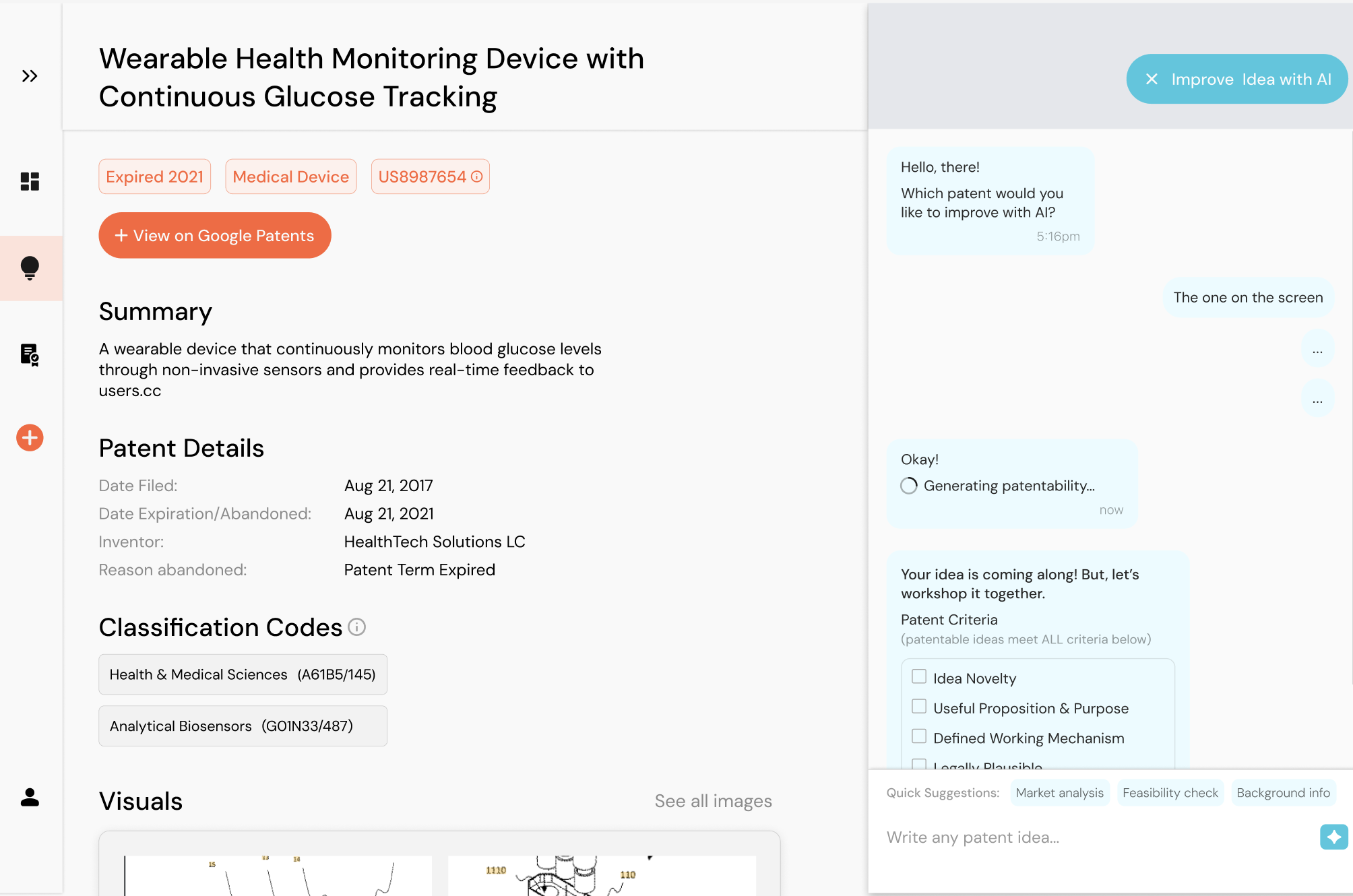
“It feels like I’m picking the final thing to be generated”
“Editing feels hard because it requires reprompting”
Decision 3: Discovery for retention
The abandoned patent feed gave users a large opportunity space, but also too much to process. Our team saw retention dropping after 1–2 days, partly because the experience felt overwhelming.
“I scrolled lots of them of them at once and then barely opened it again”
Designing with AI
In a fast-paced startup, AI let me wear more hats. I used Claude to generate feature variants and prototypes engineers could build from, moving between design, prototyping, and product decisions in the same week. Its output skewed generic, so (ironically enough), I always asked: how can I remain the driver of my own work? Gradually, I found practice in knowing when to restrain automation and protect craft.
Takeaways!
I learned that clarity and conversion don’t have to conflict. I also learned to add friction (deliberately!). When converged clicks can weaken a patent or erode a user’s sense of ownership, confirmation steps and smaller decisions keep people confident and in control. Being a non-expert helped me spot where the product felt intimidating, and teaching myself the filing process showed me how my designs should, in parallel, guide users.
The product has kept evolving since my work in Summer 2026.